Public product information
Analytical software for Amazon Selling Partners
SourceDock is a product of Odyne LLC. It is a web application and optional Chrome extension that helps Amazon Selling Partners analyze and manage their own Amazon businesses.
Who we serve
SourceDock is built for Amazon Selling Partners, including retail-arbitrage and online-arbitrage sellers, who need analytical tools to research products, check listing restrictions, estimate fees and return on investment, track purchases and sales, and ask buyers for reviews. On Pro, settlement-matched analysis shows fees and reimbursements from their own Amazon settlement data.
SourceDock is not an Amazon-owned product and is not a marketplace for Amazon data. Each selling partner uses SourceDock only for the Amazon selling account they authorize.
Amazon stores supported
SourceDock works with Amazon stores in the United States and Canada. One Amazon authorization covers both: SourceDock adds a store for each of the two that the selling partner sells in. Other Amazon stores are not supported.
- United States and Canada. Product research, Scout, Gate Scanner, the Vault, Purchases, Capital Recovery, review requests, the Sales dashboard, Account health, and Alerts.
- United States only. In the Vault, FBM profit is shown for US listings only.
- SourceDockIQ extension. The profit panel works on amazon.com and amazon.ca. Verify in Gate Scanner works on United States Seller Central only.
Analytical services, features, and functionality
The application provides the following analytical services to Amazon Selling Partners. These functions are launched. Access to Amazon Selling Partner API (SP-API) data occurs only after the selling partner authorizes SourceDock through Amazon’s Login with Amazon OAuth flow. That access is used solely to perform the functions below for that selling partner.
Product research and scouting
Product research and scouting is a launched function of SourceDock. Every published plan includes it. Selling partners use it to screen prospective products using criteria such as customer demand, sales rank, fees, listing restrictions, and return on investment, so they can make more data-driven sourcing decisions.
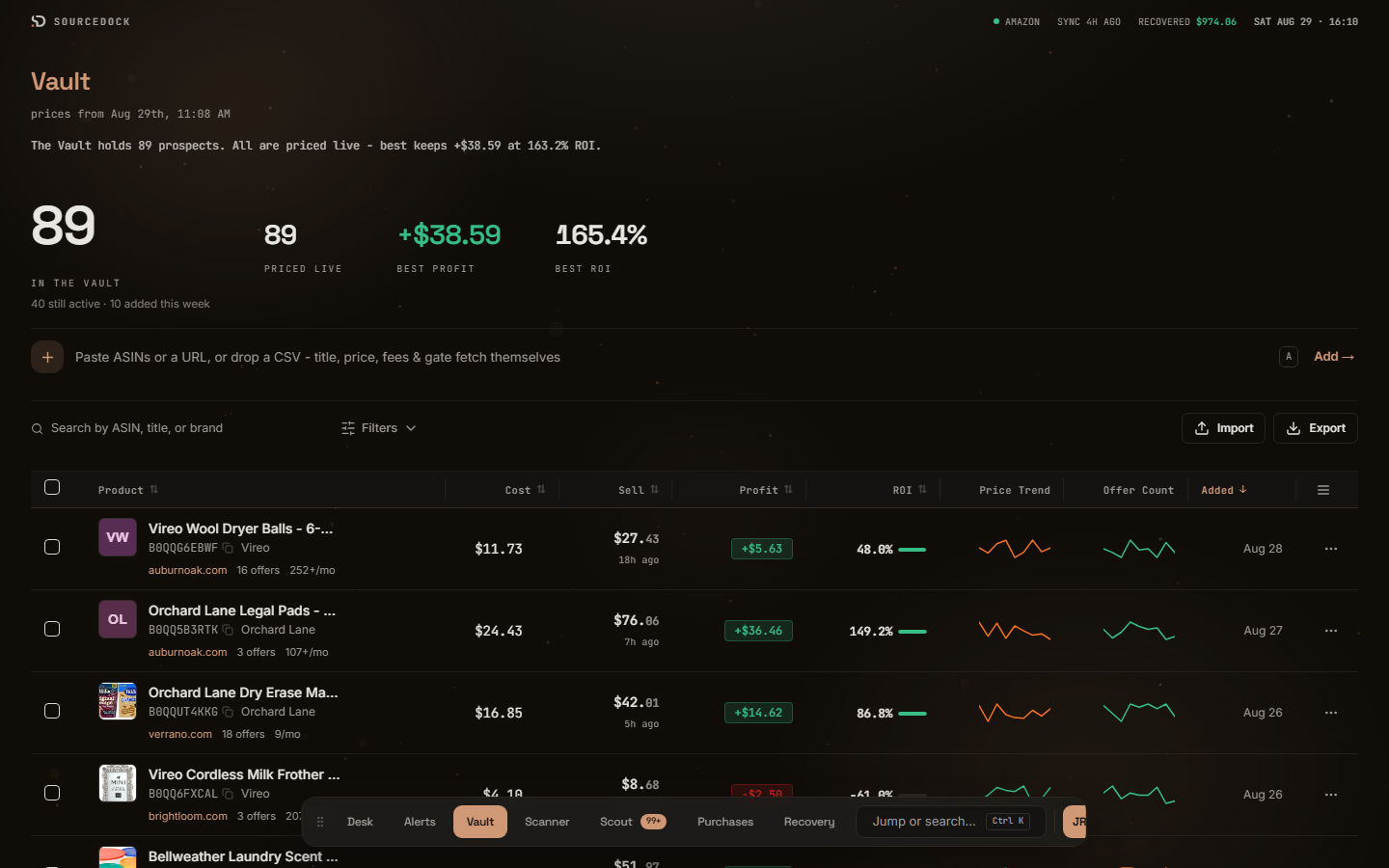
Product research: selling partners paste or import ASINs, or add ASINs found while scouting. SourceDock returns catalog metadata, Buy Box and lowest FBA pricing, sales-rank context, monthly sales estimates, estimated referral and FBA fees, and return-on-investment math. Pricing history and monthly sales estimates come from Keepa. Live Amazon listing, pricing, and fee figures come from SP-API when the selling partner has connected an Amazon account. Researched ASINs can be saved in the Vault.
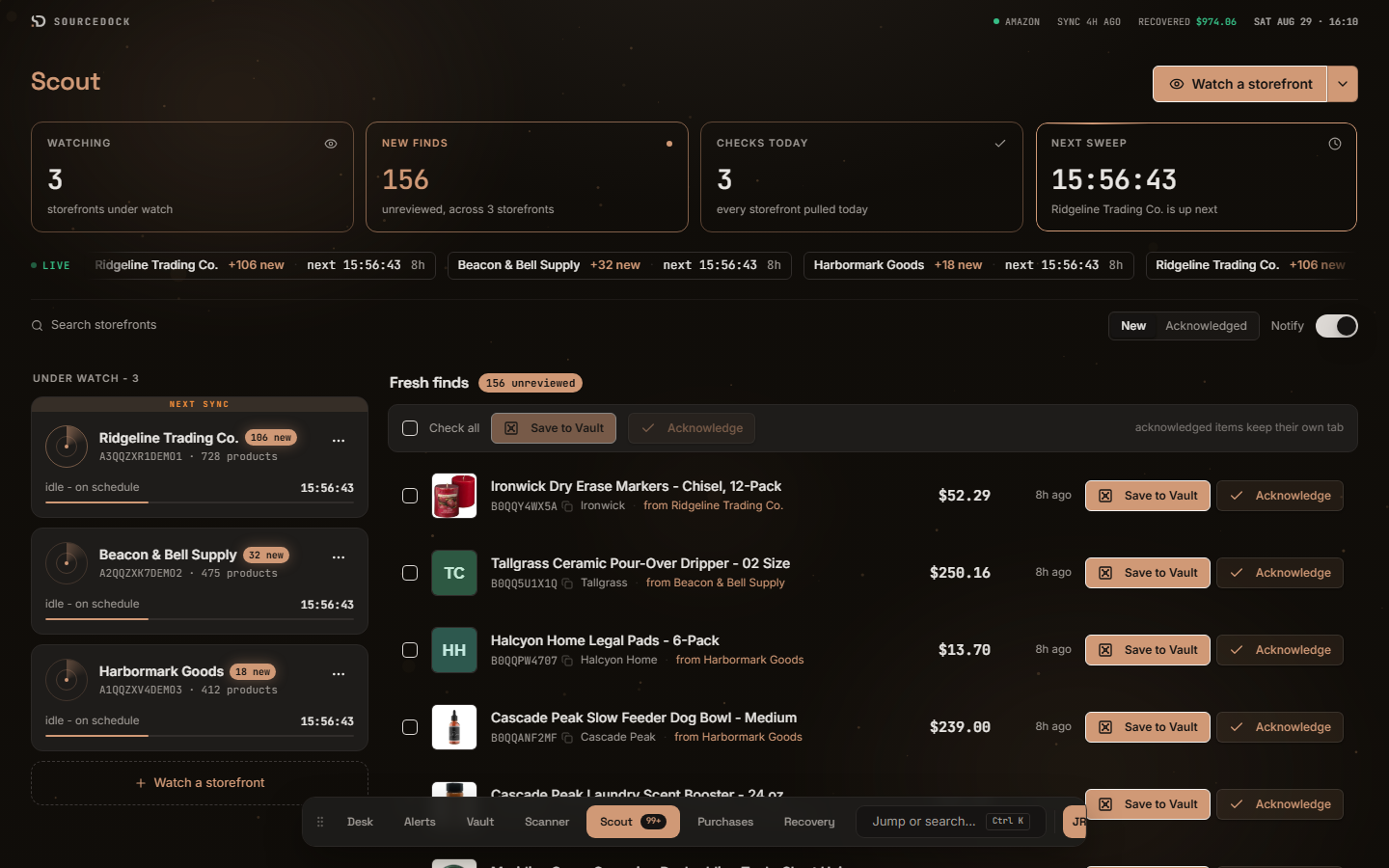
Scouting: selling partners watch publicly visible Amazon storefront catalogs (competitor storefronts) with Scout. Premier includes 10 storefronts and Pro 100, all checked daily. Scout surfaces new ASINs those storefronts offer, and lets the selling partner add those ASINs to product research. Scout uses publicly available catalog and pricing information. It does not read, pool, or display another selling partner’s private SP-API data, orders, inventory, settlements, or PII.
Brand restriction and ungating analysis
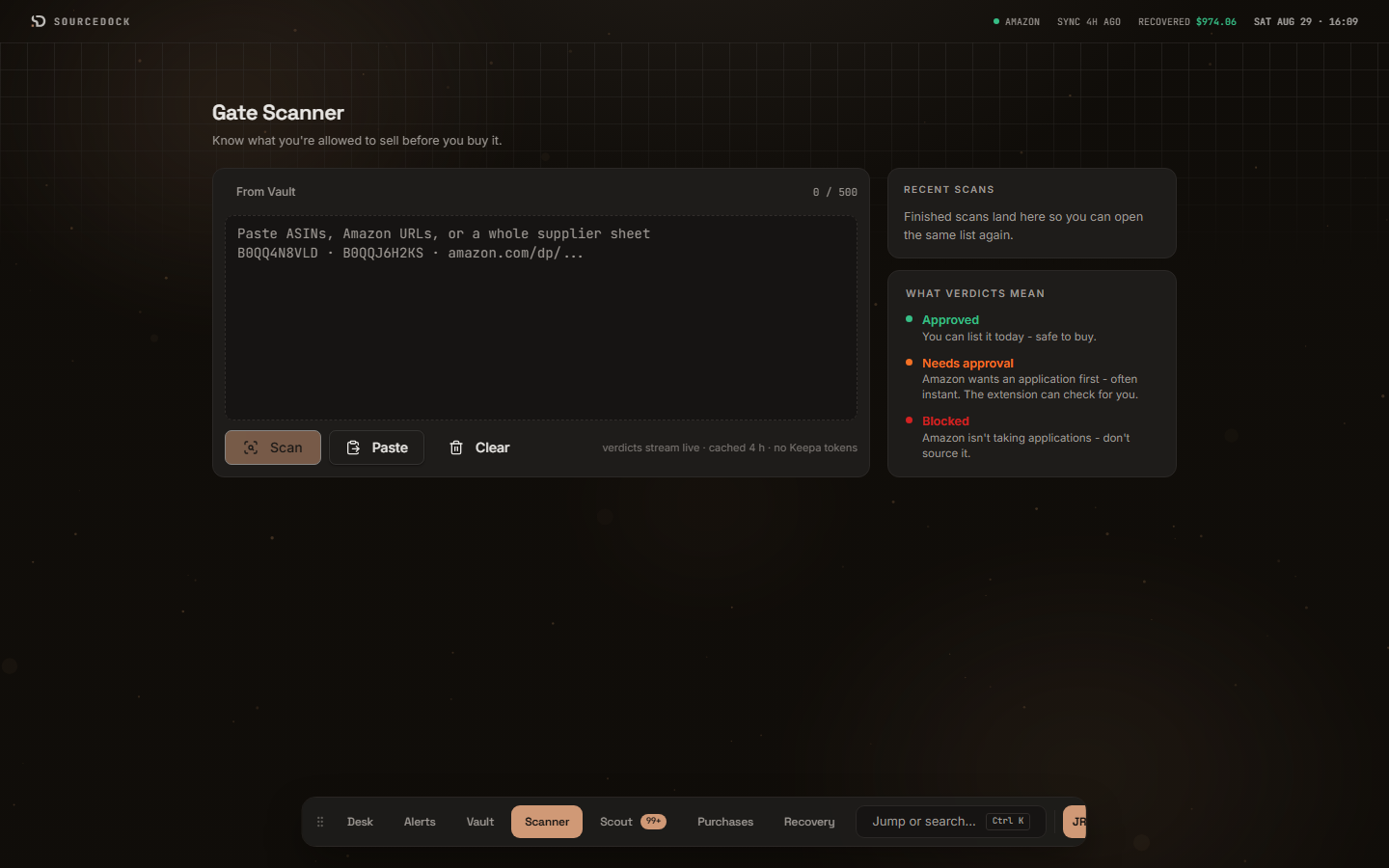
Selling partners paste or import ASINs. SourceDock reports whether each ASIN is approved, needs approval, or is blocked for the authorizing account, using the Selling Partner Restrictions API and related catalog data. Results are for that selling partner’s account only.
For ASINs that need approval, the optional SourceDockIQ extension records the answer Seller Central shows the selling partner when they open the product there, such as approved right away or documents needed. We never apply for approval. You stay in control of Seller Central.
Catalog, pricing, fee, and ROI analysis
For ASINs the selling partner is researching, SourceDock shows catalog metadata, Buy Box and lowest FBA pricing, sales-rank context, estimated referral and FBA fees, and return-on-investment math. Pricing history and monthly sales estimates come from Keepa. Live Amazon listing, pricing, and fee figures come from SP-API when the selling partner has connected an Amazon account.
Vault
Selling partners save researched ASINs, notes, and cost assumptions in a private workspace so they can compare opportunities over time.
Purchase tracking (inventory and order management)
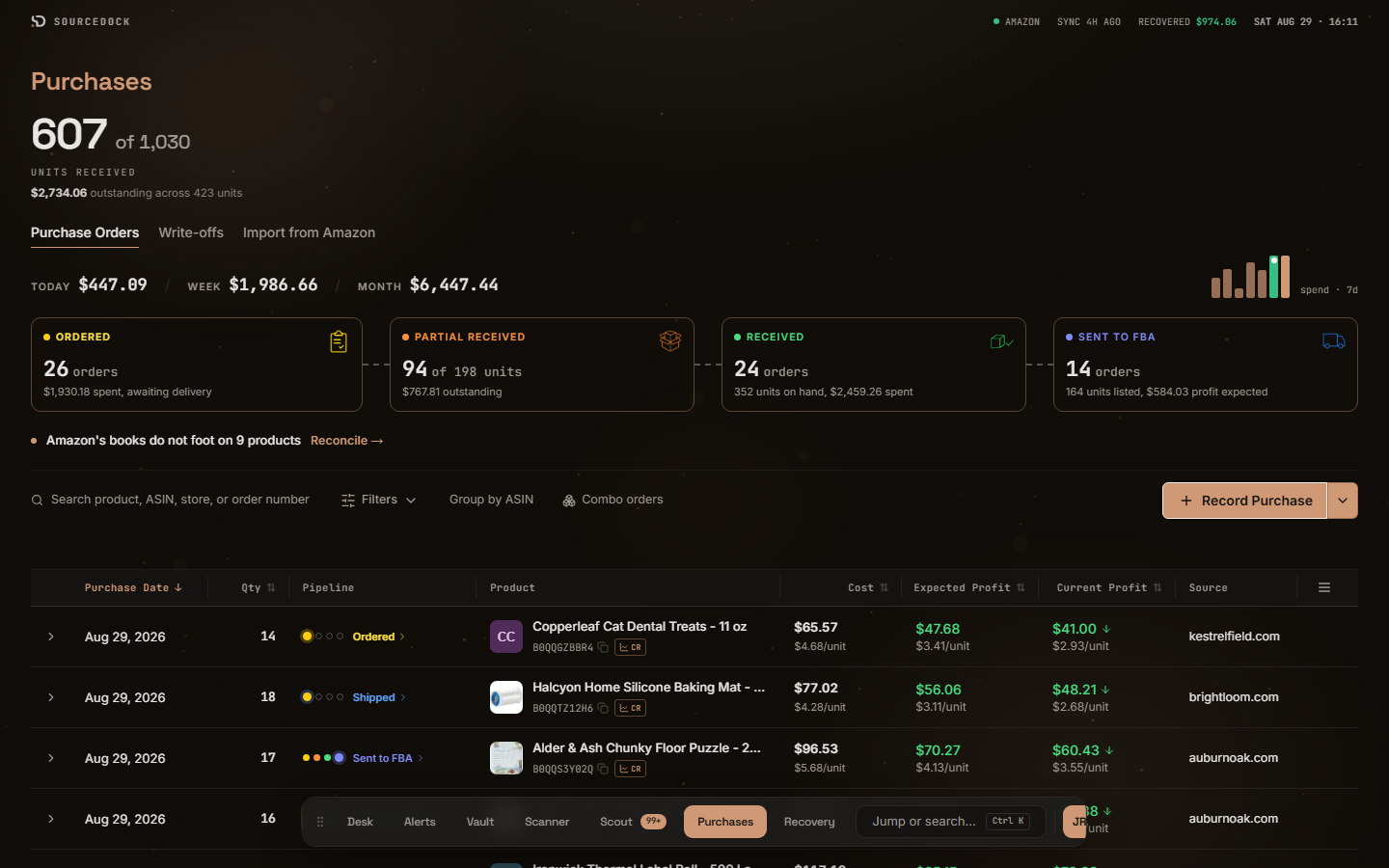
Selling partners record purchases from saved leads and follow each order from ordered through received, prepped, and listed. Spending dashboards show what they bought today, this week, and this month. Profit variance compares expected margins against current market prices.
Selling partners compare expected versus actual profit using their own cost inputs and Amazon fee and sale data for their account. This is accounting for the selling partner’s own cost of goods against their own Amazon sales and fees.
Fee and reimbursement analysis (accounting and reporting)
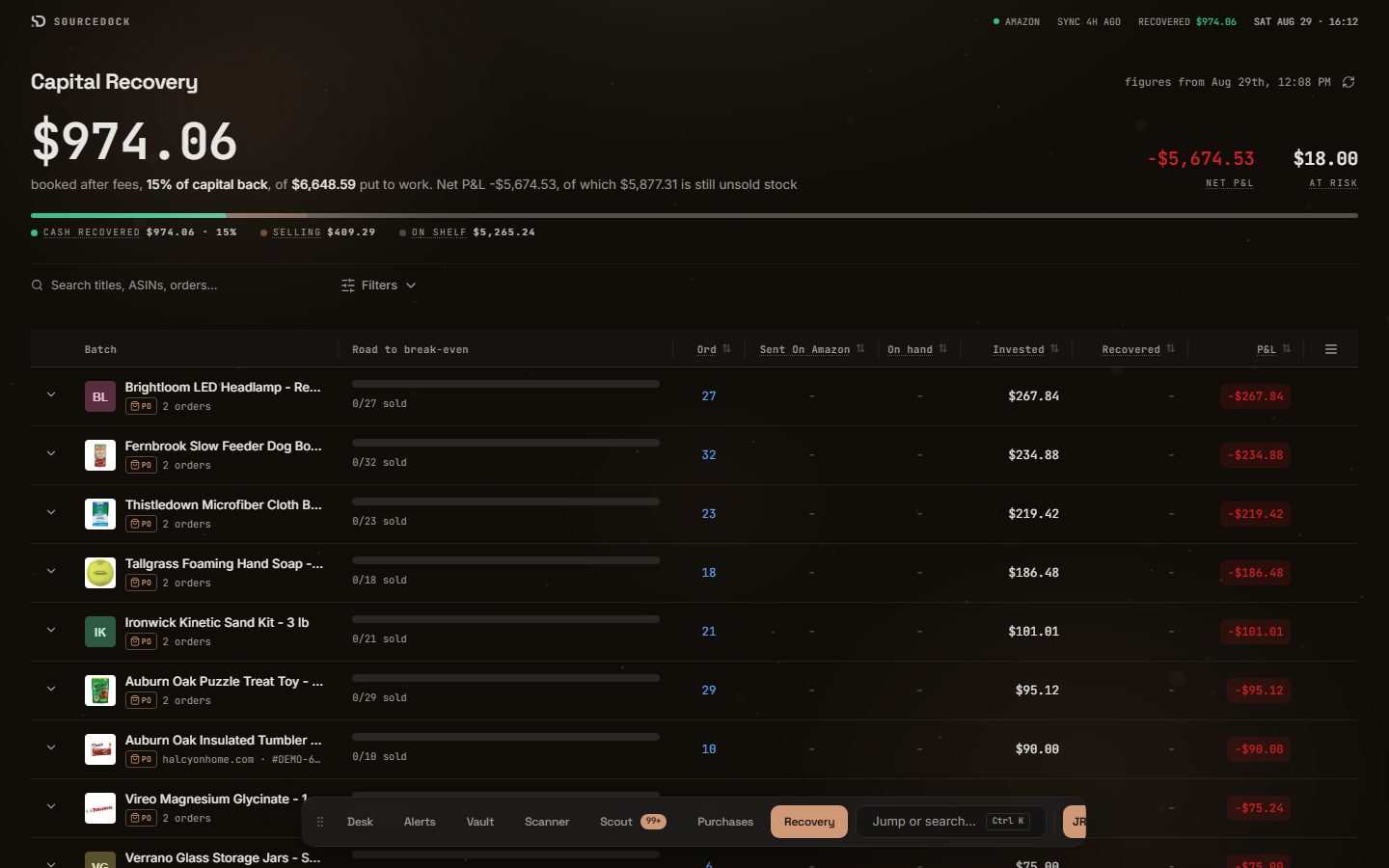
On the Pro plan, SourceDock reconciles Amazon fees and reimbursements against the selling partner’s own settlement reports and related Finances API data. The goal is a per-ASIN view of money Amazon already reported for that selling partner. This is account-level financial analysis, not a publication of Amazon’s business. Settlement-matched analysis of what Amazon paid and what it still owes. SourceDock writes each claim from Amazon's own reports, and you file it in Seller Central. You keep 100 percent. SourceDock does not file claims and does not take a commission. Pro.
Scout competitor storefront research (scouting)
Scout is the scouting tool described under Product research and scouting. Selling partners may watch publicly visible Amazon storefront catalogs to see which products those storefronts offer and which new ASINs appear. Scout uses publicly available catalog and pricing information. It does not read, pool, or display another selling partner’s private SP-API data, orders, inventory, settlements, or PII.
SourceDockIQ Chrome extension
An optional browser extension. SourceDockIQ shows Amazon's fees and your profit on Amazon product pages, and makes it easy to add ASINs to the Vault. It records real Seller Central restriction outcomes. It does not click, type, submit forms, or apply for approval. It does not change the selling partner’s Amazon account.
Analytics and reporting
On Pro, the Sales dashboard shows orders, units, sales, Amazon fees, refunds, and profit for each store and period.
Every function above is analysis and reporting on the selling partner’s own data: per-ASIN profit and ROI reporting, fee and reimbursement reporting from their settlement and Finances data, restriction results, and purchase history. SourceDock reports what Amazon already shows that selling partner; it does not list, price, fulfill, or advertise on their behalf. The only message it sends is the optional Amazon Request a Review below, for orders they choose.
Review requests (feedback and reviews)
Review requests are optional, and off until the selling partner turns them on. SourceDock uses the Amazon Solicitations API to send the standard Request a Review message from Amazon for the orders they choose, at the delay they choose inside the 5 to 30 day window Amazon allows after delivery. Amazon writes and sends the message. SourceDock never writes custom text, offers incentives, or asks for positive reviews, and each order is asked at most once. Promotional, refunded, and returned orders can be skipped. The selling partner can pause any time, and SourceDock pauses on its own if Amazon declines a request.
Operator alerts
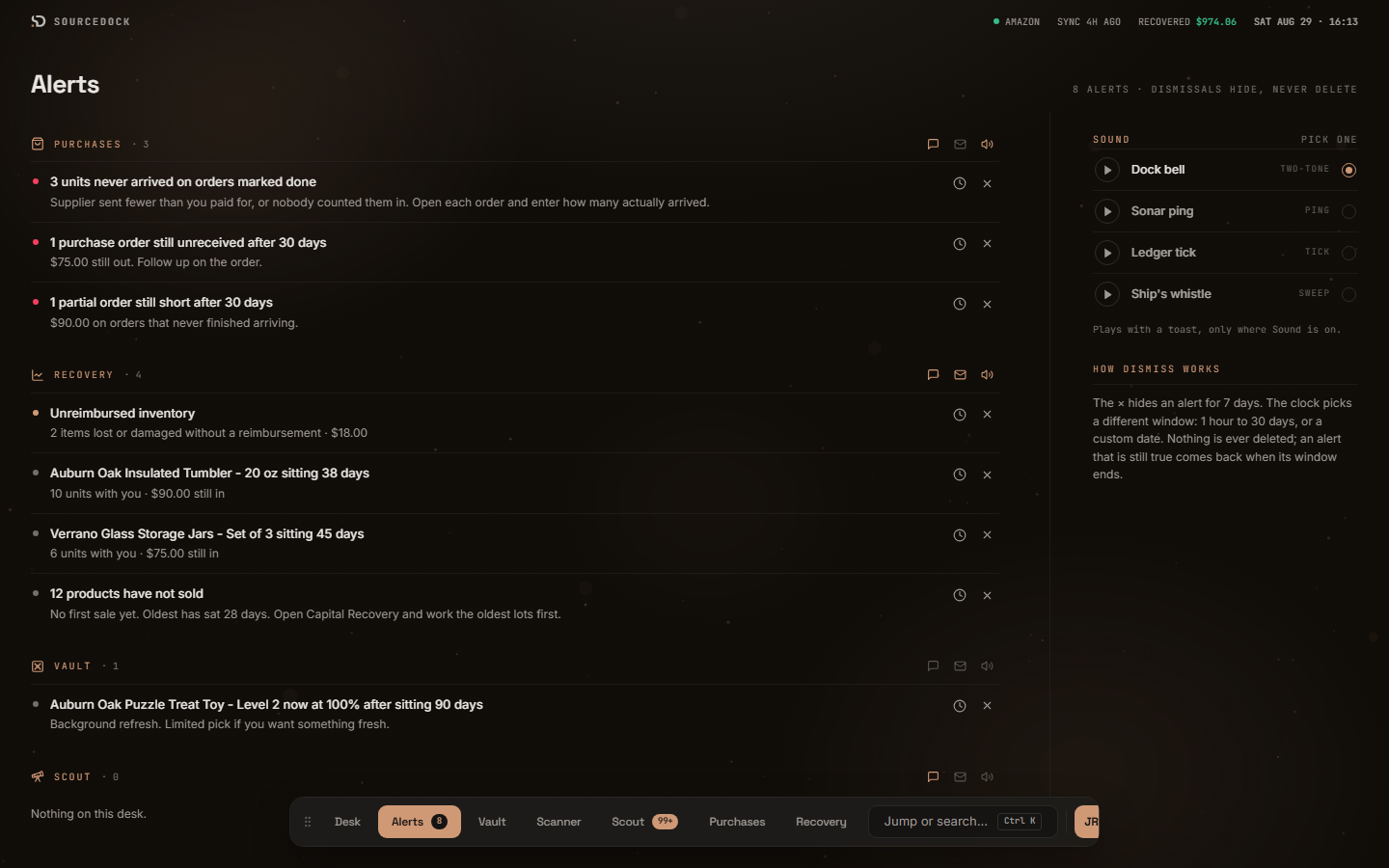
Alerts is a queue across Purchases and Vault. On Pro it also includes Recovery triage: short-count purchases, aging unreceived orders, Vault stalls, and settlement-matched exceptions. Dismissals hide an alert for a window; they never delete it.
Import and export
Selling partners can bring ASIN lists in by CSV on every plan. CSV export of workspace data is on Pro.
How it works
- Create a SourceDock account at sourcedock.io and choose a plan.
- Optionally connect an Amazon selling account through Amazon’s official authorization screen. Credentials are not collected. Amazon issues tokens; SourceDock stores the refresh token encrypted (AES-256-GCM).
- Paste ASINs or import a list, or add ASINs found while scouting competitor storefronts. Restriction, catalog, pricing, fee, and product-research analysis return for those ASINs.
- Save prospects in the Vault, log purchases, and on Pro reconcile settlement-backed fees and reimbursements for the connected account.
SourceDock does not list products, change prices, place orders, fulfill, or advertise on the selling partner’s Amazon account. The only message it sends is the optional Amazon Request a Review described above, for the orders the selling partner chooses.
Authorize Amazon access
Selling partners create a SourceDock account, then authorize access on Amazon’s official consent screen. SourceDock never collects Seller Central passwords.
Pricing
Published monthly prices in US dollars, billed through Stripe. Cancel at any time from the billing portal. Amounts on this page are generated from the same plan table the product enforces. We may change prices; this page always shows the current published amounts. Pro includes Capital Recovery. Current prices and plan limits are also at https://sourcedock.io/pricing.
| Plan | Monthly price | Included analytical capabilities |
|---|---|---|
| Premier | $29.99 | Unlimited Gate Scanner checks; Vault holds 100 products; Vault alerts for price, offers, profit, and ROI; Scout watches 10 storefronts, checked daily; Scout can check if you can sell each find; Purchases, with Reconcile; Profit calculator in Chrome; The Desk and Alerts; Price & Buy Box alerts; 1 team seat (just you); Auto-approval check; CSV import; Easy setup to connect Amazon and import your history; Capital Recovery, Sales dashboard, Account health, and Google Sheets sync during your trial. |
| Pro | $49.99 | Unlimited Gate Scanner checks; Vault holds 5,000 products; Vault alerts for price, offers, profit, and ROI; Scout watches 100 storefronts, checked daily; Scout can check if you can sell each find; Purchases, with Reconcile; Profit calculator in Chrome; The Desk and Alerts; Price & Buy Box alerts; Capital Recovery, with claims to file and the Wallet; Alerts for products selling slowly; Sales dashboard; Expenses recorded by you; Account health; Google Sheets sync; Capital Recovery Report in Google Sheets; CSV export; Ask Jax about your counts and claims; 5 team seats (you and 4 team members); Auto-approval check; CSV import; Easy setup to connect Amazon and import your history. |
Amazon Acceptable Use Policy sections 4.4 and 4.5
SourceDock’s use of Amazon Services API information is limited to acceptable activities for the Authorized User who granted access.
Section 4.4. Odyne LLC does not aggregate data across Authorized Users’ businesses or customers obtained through the Amazon Services API in order to provide or sell that data to any party, including competing Authorized Users. Each selling partner sees only data from the Amazon selling account they authorized, plus public catalog information and their own workspace inputs.
Section 4.5. Odyne LLC does not promote, publish, or share insights about Amazon’s business. We do not use insights about Amazon’s business for our own business purposes. Analytics in SourceDock describe the authorizing selling partner’s own catalog, restrictions, fees, settlements, and research list.
We do not offer a data-broker product, a resale of SP-API extracts, or a feed of Amazon’s internal business metrics.
Data, security, and privacy
- The website is served over HTTPS with a valid TLS certificate.
- Amazon refresh tokens are stored encrypted at rest with AES-256-GCM.
- SP-API access is used to read the authorizing selling partner’s restrictions, catalog, pricing, fees, and (for Capital Recovery) financial and settlement information needed for the features above, and to ask Amazon to send its Request a Review for the orders the selling partner chooses, only when they turn on review requests.
- SourceDock does not request Amazon Seller Central usernames or passwords.
- We do not sell selling-partner personal information.
- Full practices: Privacy Policy and Terms of Service.
Company identification and contact
Legal / organization name: Odyne LLC
Application name: SourceDock (SourceDockIQ extension)
Website: https://sourcedock.io/
This information page: https://sourcedock.io/for-amazon-sellers
Support: https://sourcedock.io/support
Email (direct contact): support@sourcedock.io
Selling partners and reviewers can reach us at the email address above for product questions, support, or privacy requests.
Trademark
Amazon, Amazon.com, Seller Central, and Amazon Services API are trademarks of Amazon.com, Inc. or its affiliates. SourceDock is a product of Odyne LLC. SourceDock is not affiliated with, endorsed by, or sponsored by Amazon.
