Know your profit before you buy.
Our Chrome extension puts a profit calculator on every Amazon product page. Type what you pay and see what you'd make.
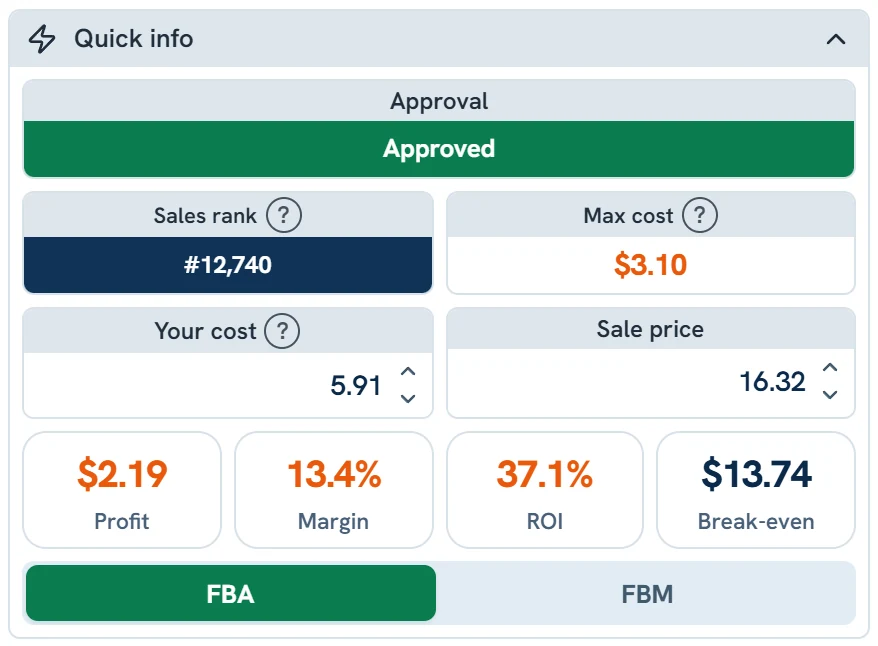
What the calculator shows
Fees, profit and ROI
Amazon's fees, your profit, margin and ROI, as soon as you type what you pay.
Max cost
The most you can pay and still hit your goals.
Sold a month
About how many sell a month, before you buy.
Can you sell it?
Approved, needs approval or blocked, checked with your own Amazon account.
How it works.
Add it to Chrome
Install the SourceDock extension and sign in.
Open any product
The calculator opens beside the Amazon page.
Type what you pay
See your profit, and the most you can pay.
The extension is on every plan, and in every 14-day trial, on Amazon US, Canada and UK. In a store? Scan a barcode with our phone app and see your profit there.
Common questions
Is this a free online calculator?
No. It's part of SourceDock's Chrome extension, on every plan and in the 14-day free trial.
Which fees does it show?
Amazon's referral, FBA fulfillment and closing fees, plus storage and inbound placement, and the total.
Can it tell me if I can sell a product?
Yes. It checks with your own Amazon account and shows approved, needs approval or blocked.
Read nextCheck if you can sell a product before you buy itSee pricing